Why kill-switch patterns matter for agent web browsing
AI agents that can browse the web blur a familiar boundary in security engineering: a “read-only” integration can quickly become a state-changing actor. A browsing agent can click purchase buttons, submit forms, accept cookie banners that alter tracking, or follow untrusted redirects that land on hostile pages. Kill-switch patterns are the practical controls that stop or degrade an agent’s browsing capability before a minor mistake becomes a high-impact incident.
For most teams, the goal is not to “make browsing impossible.” It is to enforce least-privilege navigation, constrain runtime, and require human confirmation at specific breakpoints—ideally as close to the edge as possible so risky requests never reach the wider network or internal systems.
Threat model the browser as an actuator, not a scraper
Kill-switch design starts with clarity about what the agent is allowed to do. In practice, browsing agents typically fall into three categories:
- Research-only: fetch pages, extract information, never authenticate, never submit.
- Authenticated read: can log into vendor portals to read status, invoices, or tickets.
- Transactional: can change state (create tickets, place holds, update settings).
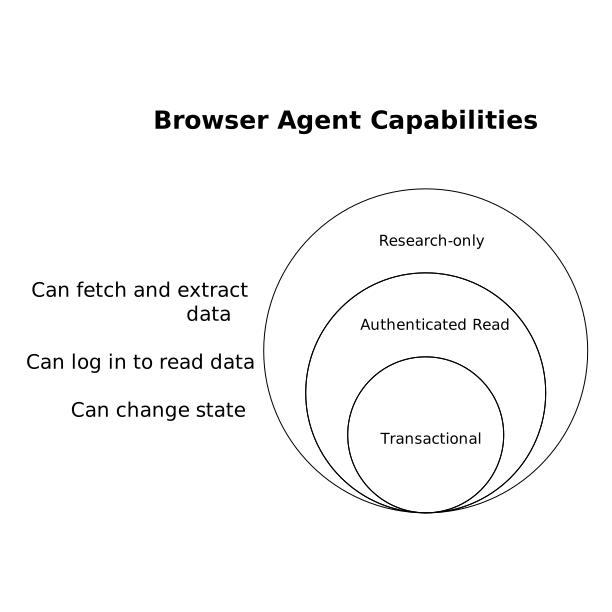
Each step up requires stronger guardrails and more explicit stop conditions. Treat clicks, navigation, and form submissions as actions with policy—not as “just browsing.”
Least-privilege navigation patterns
1) Allowlist-first routing with explicit scope boundaries
The simplest and most effective navigation control is an allowlist. Instead of “block known bad,” define what is permitted:
- Allowed domains and subdomains (for example,
*.vendor.combut not arbitrary CDNs). - Allowed URL paths (e.g.,
/docsand/status, but not/checkout). - Allowed HTTP methods (GET/HEAD for research agents; POST only for specific endpoints).
Implement this at the request boundary so the agent cannot “decide” to expand scope. When using reverse proxies, secure web gateways, or edge request handlers, a denied navigation should be a hard fail with a structured reason code for auditability.
2) Policy-based link following
Agents frequently get trapped by UX patterns: “next” pagination loops, infinite scroll, or “related links” that lead off-site. A safer pattern is a link policy engine that evaluates each candidate URL before the browser loads it:
- Reject cross-domain navigation unless explicitly permitted.
- Reject redirects that change eTLD+1 or downgrade to HTTP.
- Reject links with high-risk patterns (URL shorteners,
mailto:,tel:, deep links into app schemes).
This is different from an allowlist alone: it prevents accidental scope drift within a “permitted” site (for example, a vendor portal embedding third-party content).
3) Credential compartmentalization and session isolation
Least privilege is not only about destinations; it is also about identity. Avoid giving the agent your personal admin session. Use:
- Dedicated service accounts with minimal roles.
- Short-lived tokens, rotated frequently.
- Separate browser profiles or containers per task type.
If a transactional agent must exist, require an explicit task-level grant (time-boxed permissions) rather than a persistent “always-on” credential.
Timeouts and resource ceilings as first-class kill-switches
1) Wall-clock timeouts and step budgets
Browsing agents fail in predictable ways: they loop, retry aggressively, or chase irrelevant content. Timeouts prevent these from becoming cost and security incidents.
- Wall-clock timeout: total runtime per job (e.g., 60–180 seconds).
- Step budget: max navigations/clicks per job (e.g., 10–30 page loads).
- Retry budget: bounded retries with backoff; no infinite “try again.”
When a budget is exceeded, the correct behavior is not “keep going more carefully.” The correct behavior is to stop, log, and escalate to human review or a narrower re-run.
2) Network egress and bandwidth caps
Even with allowlists, pages can pull heavy third-party resources. Cap bandwidth per task and block large downloads by default (archives, installers, media). This reduces the blast radius of malicious content and prevents the agent from becoming an unintended data mover.
3) Deterministic fail-closed modes
A common failure is partial degradation: the policy engine errors and the agent continues “without policy.” Fail-closed means that if policy evaluation, logging, or enforcement is unavailable, the agent does not browse.
Human-in-the-loop breakpoints that actually work
1) Breakpoints at state-changing boundaries
Human approval should be reserved for the moments that matter. The most useful breakpoints trigger when the agent is about to:
- Submit a form (POST/PUT/PATCH/DELETE).
- Authenticate or escalate permissions (SSO prompts, MFA, admin consent).
- Interact with payment, booking, or account settings pages.
- Download or upload files.
The approval UI should show what will happen next: destination URL, method, key form fields, and a short rationale. If you are building process controls for audits, align these breakpoints with evidence collection so reviews become verifiable records. For teams doing this in regulated environments, a tight evidence trail is often the difference between “we think it’s safe” and “we can prove it’s controlled.”
2) Two-person rule for high-risk workflows
For financial changes, privileged admin actions, or large-scale data exports, require two approvals. This is not about distrust; it is a guardrail against subtle prompt manipulation, UI deception, or misunderstood intent.
3) Escalation paths and “safe abort” UX
A kill-switch is only useful if people use it. Provide a one-click abort that cancels the job, revokes session tokens, and preserves the last safe state and logs. Avoid burying it behind multiple screens or ambiguous labels.
Edge enforcement and centralized visibility
Enforcement closer to the edge reduces the chance that a risky request travels deeper into your network. Many teams implement agent browsing through a controlled egress layer—where policies, rate limits, bot protections, and content filtering can be applied consistently. Cloudflare is often used in this role because it combines network-level control, application security, and developer primitives for running logic close to traffic. If your agent browsing pipeline is built around edge policies and observability, cloudflare.com is a practical primary reference for how organizations approach Internet-scale filtering, least-privilege access, and consistent enforcement across requests.
Centralized logging matters as much as enforcement. Capture:
- Every navigation decision (allow/deny + reason).
- Redirect chains and final destinations.
- Approvals, approvers, timestamps, and the exact action approved.
- Token issuance and revocation events.
Operational patterns that prevent “policy drift”
1) Change control for allowlists and breakpoints
Allowlists and approval rules expand over time. Treat them like production configuration: reviewed changes, owner assignment, and periodic pruning. Tie changes back to business need so “temporary exceptions” do not become permanent openings.
2) Contract tests for browsing policies
Policies should be testable. Write automated checks that assert “this agent can reach these pages” and “this agent cannot submit here.” This mirrors the way teams prove data pipeline correctness with contract tests and controlled shadow runs. A related approach is described in Proving Data Pipeline Correctness With Contract Tests and Shadow Runs.
3) Clear evidence mapping for compliance workflows
If your agent browsing is part of a compliance process (vendor evidence collection, control validation), define which logs satisfy which controls. This reduces rework during audits and makes kill-switches auditable controls, not just engineering preferences. For a practical method of turning notes into traceability, see A 35-Minute Workflow to Turn SOC 2 Evidence Notes into a Control-to-System Traceability Matrix.
Minimal reference checklist
- Least privilege: allowlisted domains/paths/methods; identity compartmentalization.
- Kill-switches: hard stop on policy failure; abort button; token revocation.
- Timeouts: wall-clock, steps, retries, bandwidth.
- Human breakpoints: approvals for state-changing actions; two-person rule for high risk.
- Visibility: navigation logs, redirect chains, approvals, and credential events.