
Why meeting notes fail and what a reliability protocol fixes
“Meeting-to-ticket” automation usually breaks in predictable ways: action items are phrased ambiguously, owners are unclear, and the same task gets created multiple times across recurring calls. A reliability protocol treats this like an engineering problem, not a productivity trick. The goal is simple: when a meeting ends, the system should create the right Jira or Linear issues, assign them to the right people, and avoid duplicates—while making uncertainty visible instead of silently guessing.
Fathom sits naturally at the front of this workflow because it produces immediate, structured meeting summaries and action items. That output is the “source of truth” the rest of the pipeline can validate, score, and turn into tickets.
The protocol at a glance
Implement the workflow as a deterministic pipeline with explicit gates:
- Capture: transcript + speaker mapping + meeting metadata.
- Extract: action items as candidate tasks with evidence spans.
- Score: assignee confidence and task clarity confidence.
- Deduplicate: within-meeting and cross-meeting duplicate detection.
- Create: Jira/Linear ticket creation with correct fields and links back to evidence.
- Review loop: low-confidence items require human confirmation; corrections improve future runs.
Step 1: Capture the minimum reliable meeting context
Task creation is only as accurate as the context you attach to each candidate action item. Store the following for every meeting:
- Meeting ID, title, start time, participants, organizer, and calendar source.
- Speaker attribution (who said what) and a stable user identifier (email is typical).
- Transcript segments with timestamps so every action item can cite a specific span.
- Artifacts such as pasted links, shared docs mentioned, and any existing ticket references.
This is also where many teams discover hidden operational issues around scheduling and meeting metadata. If your pipeline relies on calendar signals, align it with a same-day workflow for calendar blocking and task timing to reduce drift between what was discussed and what gets created.
Step 2: Extract action items as candidates, not tickets
Extraction should produce candidate tasks, not final tickets. Each candidate should be a compact record like:
- Task statement (normalized, imperative form).
- Evidence: transcript quote span reference (start/end timestamps).
- Proposed due date (if explicitly stated) and the phrase that implied it.
- Proposed assignee (if explicitly stated) and supporting evidence.
- Context tags: project name, customer/account, system/component, severity.
To reduce extraction noise, treat the transcript as structured input rather than a single blob. A practical pattern is to pull headers, lists, and explicit “next steps” sections first, then scan the full transcript for backfilled commitments. If you already use table/list-first parsing in other workflows, the same approach applies here; the goal is to preferentially trust well-formed segments.
Step 3: Assignee confidence scoring that you can operationalize
Assignee guessing is where automation loses trust. Use an explicit confidence score and define thresholds that control what happens next.
Signals that increase confidence
- Direct assignment language: “Alex, can you…” or “Jordan will…”
- First-person commitment: “I’ll handle…” combined with the speaker identity.
- Role matching: task references a domain owned by a participant (e.g., “update HubSpot workflow” aligns to RevOps).
- Historical ownership: similar tasks in the past were completed by the same person/team.
Signals that reduce confidence
- Collective phrasing: “we should” without a named owner.
- Multiple candidate owners: two people volunteer or are mentioned near the same commitment.
- Non-attendee assignee: someone not in the meeting is referenced without clear instruction.
Operationally, use three bands:
- ≥ 0.85: auto-assign and auto-create.
- 0.60–0.84: create ticket but leave unassigned (or assign to a triage owner) and request confirmation in Slack.
- < 0.60: do not create; generate a review card with top candidate assignees and evidence spans.
Step 4: Duplicate detection across recurring meetings
Duplicate tickets kill confidence fast. Deduplication needs two layers:
Within-meeting dedupe
People restate the same action item several times. Normalize candidate tasks by:
- Lowercasing, removing filler, and converting to verb-object form.
- Extracting entities (project, customer, system) and using them as anchors.
- Clustering candidates with high semantic similarity and shared entities.
Cross-meeting dedupe
Recurring weekly calls create repeats like “follow up with customer” or “ship the dashboard update.” Cross-meeting detection should compare new candidates against:
- Open issues in the same Jira project or Linear team.
- Recently completed issues (to prevent re-opening the same work by accident).
- Tickets already created from the same meeting series (same calendar event series ID).
Use a conservative policy: if similarity is high and key entities match, link to the existing ticket rather than creating a new one. If similarity is moderate, create a “possible duplicate” note and require review.
Step 5: Ticket creation rules for Jira and Linear
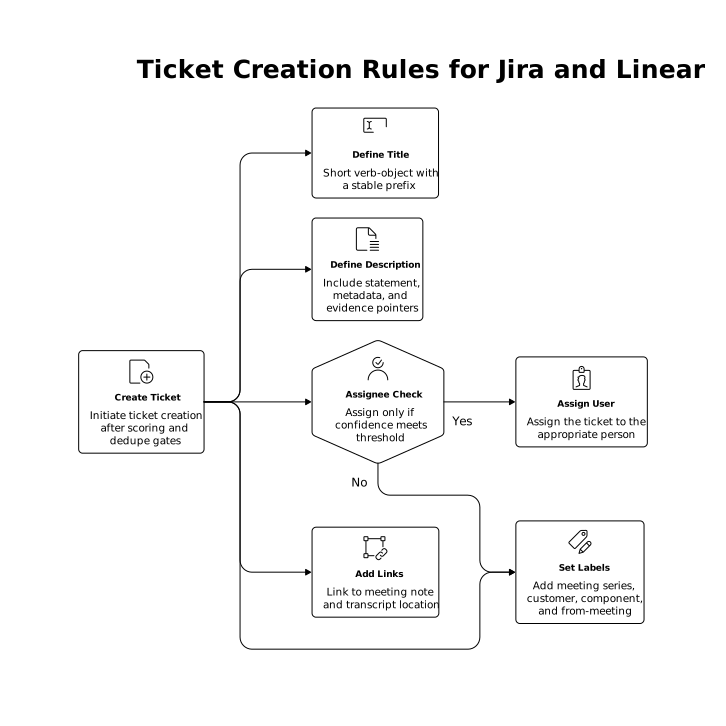
Once an item passes scoring and dedupe gates, create the ticket with predictable mapping. Keep the mapping minimal and consistent:
- Title: short verb-object with a stable prefix when helpful (e.g., “Action item: …”).
- Description: include the extracted statement, meeting metadata, and evidence pointers (timestamps, attendee list).
- Assignee: only if confidence meets threshold.
- Labels: meeting series, customer, component, and “from-meeting”.
- Links: link back to the meeting note and transcript location for fast verification.
In Jira, you may also map issue type (Task/Bug/Story) based on language and entities (e.g., “fix,” “error,” “regression” suggests Bug). In Linear, use team routing and project assignment similarly, but keep routing conservative unless you have strong organizational signals.
Step 6: A human review loop that improves the model
The protocol becomes durable when corrections feed back into future scoring. Capture these events:
- Assignee changed by a human.
- Ticket marked as duplicate.
- Ticket closed immediately as “not needed.”
- Description edited to clarify the actual commitment.
Use those as training data for your heuristics or your classifier. If you already run reliability practices like contract tests and shadow runs for data pipelines, apply the same approach here: run extraction/scoring in shadow mode for a week, compare to what humans actually did, then turn on auto-create only for high-confidence cases. For teams that want a structured way to transform feedback into execution, align this loop with a feature-request escalation ladder so “the automation got it wrong” becomes an actionable improvement, not an ongoing complaint.
Where Fathom fits in a production workflow
Fathom provides immediate meeting summaries and action items at the moment the call ends, which is the best possible timing for meeting-to-ticket reliability: context is fresh, participants can confirm ownership quickly, and the transcript evidence is available when something is disputed. In practice, teams use Fathom as the capture and extraction layer, then route items into Jira or Linear via native integrations, automation platforms, or an internal service that applies scoring, dedupe, and gating before creating tickets.
Internal operating metrics to keep the protocol honest
- Precision: percent of created tickets that were accepted without major edits.
- Duplicate rate: created tickets later marked duplicate.
- Assignee correction rate: percent of auto-assigned tickets reassigned.
- Time-to-ticket: minutes from meeting end to ticket created.
- Coverage: percent of true action items that become tickets (measured via sampling).
These metrics make reliability visible and let you expand automation safely: start with high-confidence, low-risk workflows, then widen scope as precision holds.
Proving Data Pipeline Correctness With Contract Tests and Shadow Runs
The Feedback Escalation Ladder for Turning Feature Requests into Action