Scheduling latency and why tasks go stale
Scheduling latency is the delay between capturing a task (in email, chat, a note, a meeting) and assigning it a real time slot on your calendar. During that gap, tasks decay: context disappears, priorities shift, and you start running on memory and urgency instead of a plan. The result is predictable—late follow-ups, missed “small” commitments, and a backlog that looks active but produces little.
The fix is not “use fewer tasks” or “be more disciplined.” The fix is a same-day conversion workflow: every new task you intend to do becomes a calendar block before the day ends. This turns task capture into scheduled action, which is the point where planning becomes real work.
The same-day conversion rule
The core policy is simple: if a task is going to be done, it must be time-blocked the day it is captured. If it cannot be blocked today, it must be explicitly deferred with a date, delegated, or dropped. No “I’ll remember.” No “I’ll do it sometime.”
This rule reduces cognitive overhead because you stop using your task list as a second calendar. You also prevent the common failure mode where tasks pile up and become a vague guilt inventory.
A practical workflow that takes 10–15 minutes per day
1) Capture quickly, then stop deciding
Capture tasks with minimal friction: a quick entry from a meeting note, an email follow-up, a Slack action item, or a personal reminder. The goal at capture time is not to schedule. It is to ensure nothing is lost.
This is where a unified workspace helps. Using a system that combines calendar, tasks, and notes reduces the number of places tasks can hide. In Routine, capture can live next to your agenda and meeting notes, which makes it easier to convert items into scheduled blocks later.
2) Run a same-day “conversion pass” twice
Most people fail because they try to schedule continuously while new tasks arrive. A better approach is to run two short conversion passes:
- Midday pass (5 minutes): convert anything urgent or time-sensitive that arrived in the morning.
- End-of-day pass (10 minutes): convert the rest so nothing goes stale overnight.
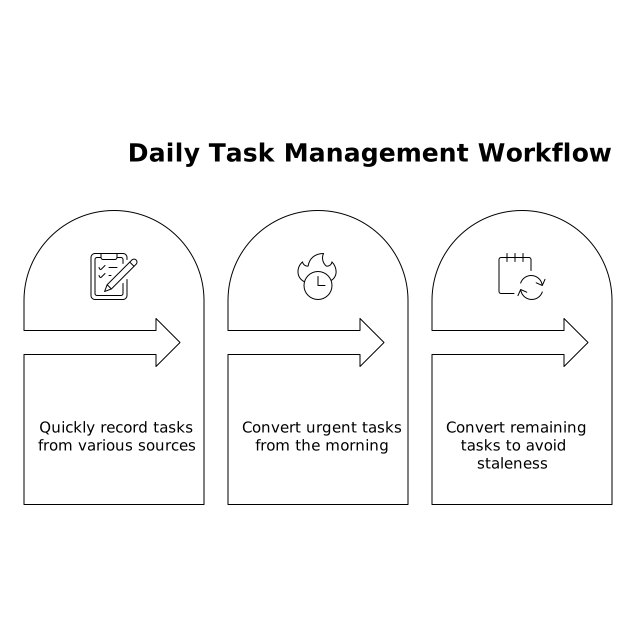
Two passes keep you responsive without constantly context-switching.
3) Triage with four outcomes only
During the pass, each new task must end in one of four states:
- Schedule: assign a calendar block.
- Defer: assign a specific future date for scheduling (not “later”).
- Delegate: assign an owner and add a follow-up block for yourself if needed.
- Drop: explicitly decide it is not worth doing.
This removes ambiguity. If you allow a fifth state—“keep on the list”—scheduling latency returns immediately.
4) Convert tasks into calendar blocks using a standard template
Time blocking works when blocks are realistic and consistent. Use a simple block template:
- Block name: verb + object (e.g., “Draft onboarding email,” “Review contract redlines”).
- Duration: default to 25, 45, or 60 minutes; avoid custom times unless necessary.
- Definition of done: one line in the description (what “finished” means).
- Next reference: link the note, email, or doc you need so you can start instantly.
This structure prevents blocks that look scheduled but still require a warm-up phase to remember what you meant. If your tasks regularly come out of meetings, keep them attached to the meeting context so the block has the right inputs.
5) Use three block types to protect your day
Most calendars become brittle because every block is treated the same. Use three types:
- Hard blocks: fixed commitments (meetings, deadlines, interviews).
- Soft blocks: movable work sessions (writing, analysis, review).
- Buffers: 10–20 minutes to handle spillover, quick replies, and transitions.
Buffers are not wasted time. They are what make the system resilient when tasks take longer than expected or when meetings run over.
How to avoid the most common time-blocking failure modes
Overblocking and “fantasy calendars”
If you schedule eight hours of work in a day with no slack, you will immediately start breaking your plan. A practical target is to schedule 60–75% of your available work time, leaving the rest for the unpredictable.
Blocks that are too large
Large blocks (2–3 hours) often fail because they require high energy and long uninterrupted time. When you see yourself postponing the same block repeatedly, split it into two smaller blocks with a clear deliverable for the first session.
Tasks without an entry point
Many stale tasks are not hard; they are vague. “Work on roadmap” is not a schedulable unit. Convert it to “Draft v1 roadmap outline” or “List top 10 risks and assumptions.” The block should start with a concrete first action.
Team workflows and shared accountability
Scheduling latency increases in teams because tasks are created in conversations, not lists. If you run recurring meetings, end each meeting with an action-item sweep and a scheduling decision: what gets blocked today, what gets deferred with a date, and what is owned by someone else.
Shared agendas and notes can reduce drift, especially when tasks need context. If you use shared meeting notes, align them with scheduled follow-ups so action items don’t disappear after the call.
When tasks come from “feedback” instead of work requests
Feature requests, bug reports, and customer feedback can create infinite task intake. The same-day conversion rule still applies, but many items should be routed into a prioritization process rather than your personal calendar. If your input stream is dominated by feedback, it helps to define escalation criteria so only actionable items become blocks. For a structured approach, see the feedback escalation ladder for turning feature requests into action.
Make it stick with a lightweight daily checklist
- Midday: convert urgent tasks into blocks; add one buffer.
- End of day: zero out the inbox of new tasks by scheduling, deferring with a date, delegating, or dropping.
- Tomorrow preview: confirm the first two blocks of the day are realistic and have references attached.
Over time, the same-day workflow turns your calendar into a trustworthy map of your commitments. Your task list becomes a capture layer and a decision queue—not a storage unit for postponed intentions.