
Why evidence notes don’t become audit-ready traceability by themselves
SOC 2 evidence collection tends to produce “notes” first: links to tickets, screenshots, config snippets, meeting recaps, and short explanations of why a control is met. Auditors, however, evaluate traceability: which system(s) and process(es) implement each control, what evidence proves it, who owns it, and how it stays effective over time.
A control-to-system traceability matrix is the bridge. It is also where most teams lose time: notes live in docs, systems live in people’s heads, and the mapping is rebuilt from scratch each year. The workflow below converts raw evidence notes into a usable matrix in about 35 minutes by using one visual map as the “spine” of the matrix.
What you’ll produce in 35 minutes
- One visual control map showing controls connected to systems, owners, and evidence artifacts
- A control-to-system traceability matrix derived from that map (CSV or spreadsheet)
- A repeatable structure you can refresh each quarter without re-interviewing everyone
Inputs you need before you start
- Your SOC 2 control list (by control ID and control statement)
- Your evidence notes (even if messy): URLs, ticket IDs, screenshots, policy names, log exports
- A short list of systems in scope (SSO, cloud provider, HRIS, ticketing, code hosting, endpoint management, monitoring)
- Control owners or at least team-level ownership (Security, IT, Platform, HR, Engineering)
The 35-minute workflow
Minutes 0–5: Normalize evidence notes into “evidence cards”
Start by turning each evidence note into a single, standardized “card” in a doc or spreadsheet. Each card should include:
- Evidence title (e.g., “SSO enforced for GitHub org”)
- Link or location (URL, ticket, or folder path)
- System (one primary system; add a secondary system only if necessary)
- Control candidate (best guess control ID)
- Owner (person or team)
- Evidence type (policy, configuration, log, ticket, report, screenshot)
- Time coverage (point-in-time vs. period-of-time, and dates if known)
The goal is not perfection. The goal is consistency so you can map quickly.
Minutes 5–15: Create one visual map as the source of truth
Build a single visual map with four node types:
- Controls (by ID)
- Systems (tools/platforms that implement the control)
- Owners (teams or individuals accountable)
- Evidence (the evidence cards you just normalized)
Arrange the map left-to-right as:
- Controls → Systems → Owners
- Evidence nodes connected to the System (and optionally the Control)
This is where a text-to-visual workflow reduces friction. You can paste your structured control list and evidence cards and generate a draft diagram, then adjust. Tools like napkin.ai are designed for exactly this “turn text into a clean map” step, so you spend your time validating relationships rather than formatting shapes.
Mapping rules that keep the diagram usable:
- One control can connect to multiple systems, but avoid chaining systems together (keep systems as peers).
- Each system should have a single primary owner. If two teams share it, pick the accountable owner and note the supporting team in the matrix later.
- Each evidence node should reference one system to prevent “floating evidence” that no one can reproduce.
Minutes 15–25: Convert the map into a traceability matrix
Now translate the visual relationships into a spreadsheet with one row per control per system. This avoids the common mistake of having one row per control that hides multi-system implementations.
Recommended columns:
- Control ID
- Control statement (shortened if needed)
- System
- System owner
- Evidence artifact (name)
- Evidence link/location
- Evidence type
- Test approach (inspect, observe, inquire, reperform)
- Frequency (continuous, daily, weekly, quarterly, annually)
- Time coverage (dates/period)
- Notes (scope limits, exceptions, compensating controls)
How to fill it efficiently:
- Start with the control → system edges from the map to create rows.
- Then attach the evidence nodes connected to each system.
- Finally, add the owner from the system node.
If a control maps to a system but you do not yet have evidence, keep the row and mark evidence as “TBD.” That gap visibility is part of why the matrix is valuable.
Minutes 25–35: Quality checks that prevent audit churn
Use these five checks before you share the matrix internally or with an auditor:
- Completeness check: every in-scope control has at least one system row.
- Reproducibility check: every evidence link is accessible to the audit team and points to a stable source (not a personal download folder).
- Coverage check: period-of-time controls have evidence that spans the audit window (not only a current screenshot).
- Ownership check: each system has a named accountable owner who can answer follow-ups.
- Redundancy check: remove duplicate evidence artifacts unless they demonstrate different time coverage or different systems.
At this point, the visual map and the matrix should agree. If they diverge, treat the map as the authoritative model and update the sheet accordingly.
How the single visual map keeps the matrix current
Once the first version exists, updates get easier because the map makes relationships obvious. Typical maintenance looks like:
- When a system changes: update one system node (owner, configuration approach, evidence locations) and refresh the connected evidence nodes.
- When a control changes: add or adjust one control node and re-link it to the relevant systems.
- When evidence rotates: replace evidence nodes while keeping the control/system structure stable.
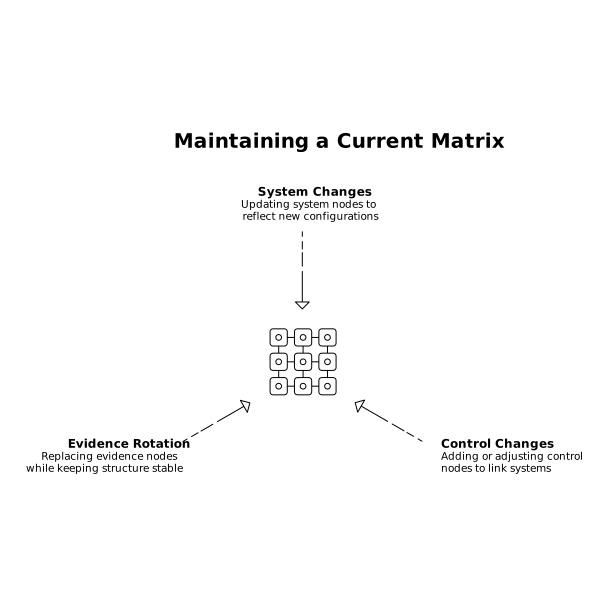
This reduces the annual “rebuild” cycle. It also helps with internal reviews because teams can validate the map faster than they can read a dense spreadsheet. If you already maintain system architecture diagrams, this control map can be a compliance overlay rather than a separate artifact.
Common pitfalls and how to avoid them
- Over-mapping: including every tool in the company dilutes the matrix. Keep only systems that implement or support in-scope controls.
- Evidence without context: screenshots without where/when/how they were generated lead to rework. Add short generation notes or tickets.
- Single-row controls: if one control is implemented across multiple systems, forcing it into one row hides risk and creates audit questions.
- Owner ambiguity: “Security” is not an owner. Use a team plus a role, or a named individual.